> ## Documentation Index
> Fetch the complete documentation index at: https://docs.shiga.io/llms.txt
> Use this file to discover all available pages before exploring further.
# Shiga Wallet Made Easy
> Activate & Use Your Shiga Wallet
This guide walks you through **every single step** of activating your Shiga Wallet, **including all supported networks**.
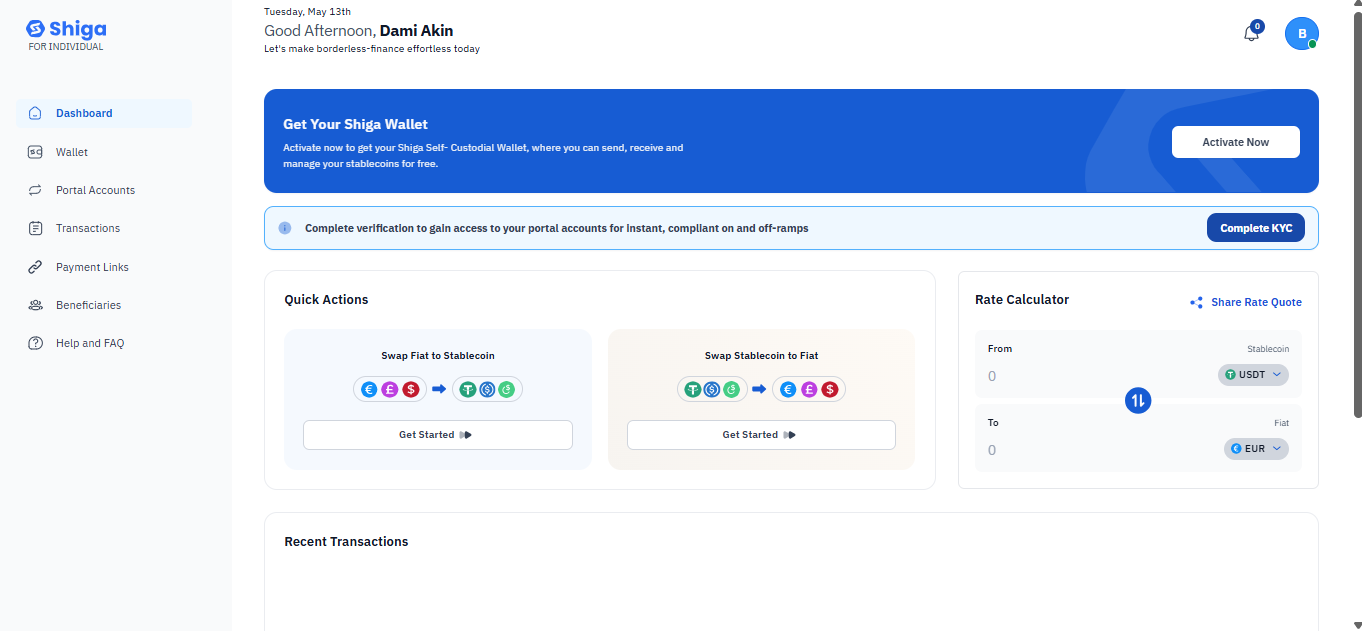
## **Log In & Understand the Dashboard**
After logging in, you'll see:
### **Left Sidebar Menu**
* Wallet *(Inactive)*
* **Portal Accounts** *(Active after verification)*
* **Transactions** *(View history)*
* **Payment Links** *(Create payment requests)*
* **Beneficiaries** *(Save frequent recipients)*
* **Help and FAQ** *(Support center)*
### **Wallet Activation Banner**
* Prominent message:
> *"Get Your Shiga Wallet – Activate now to get your Shiga Self-Outdated Wallet, where you can teach, receive and manage your stakeholder for free."*
 ## **Complete Mandatory KYC Verification**
*(Required before full wallet access)*
1. Click the verification link in the banner.
2. Submit:
* Government-issued ID *(Passport/Driver’s License)*
* Proof of address *(Utility bill/bank statement \<3 months old)*
🔹 *Until verified, features like "Portal Accounts" remain locked.*
## **Complete Mandatory KYC Verification**
*(Required before full wallet access)*
1. Click the verification link in the banner.
2. Submit:
* Government-issued ID *(Passport/Driver’s License)*
* Proof of address *(Utility bill/bank statement \<3 months old)*
🔹 *Until verified, features like "Portal Accounts" remain locked.*
 ## **Access Your Wallet Dashboard**
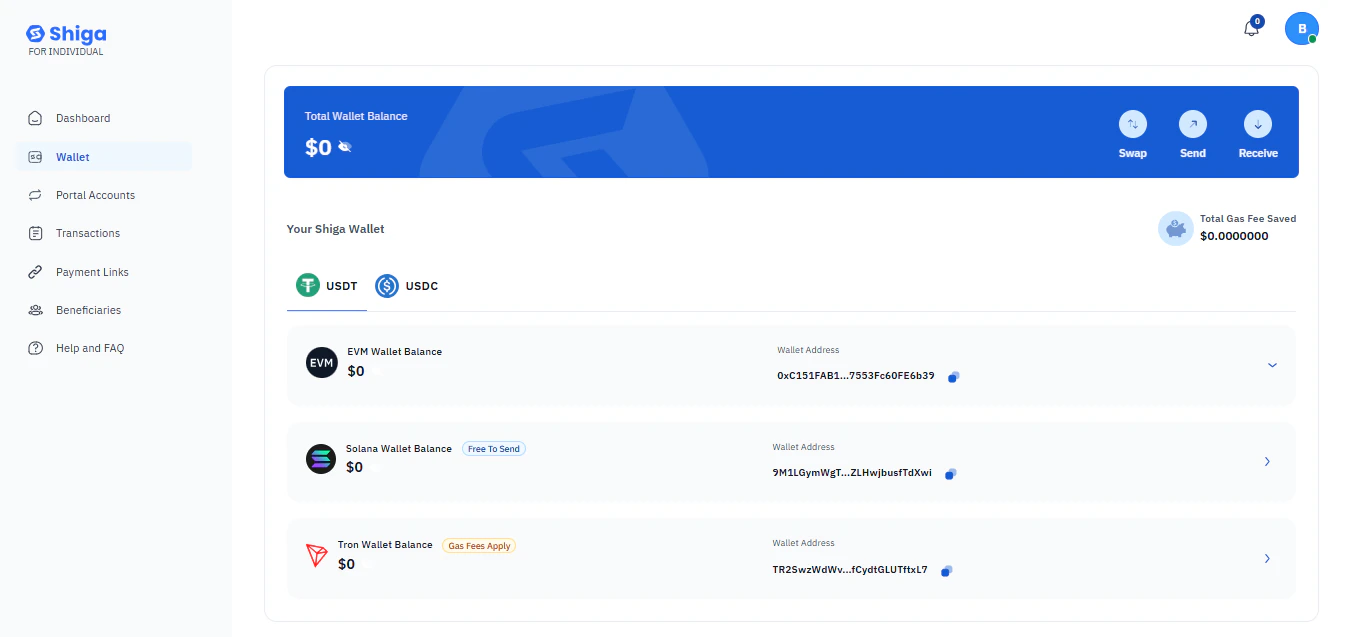
### **Balance Overview**
* **Total Wallet Balance:** \$0 *(Initially).*
* **Shiga Wallet:** Shows balances for:
* **1USDT** *(Tether).*
* **EYN Wallet Balance:** \$0 *(Additional wallet).*
* **Solana Wallet Balance:** \$0 *(Free to use).*
### **Supported Networks for USDT**
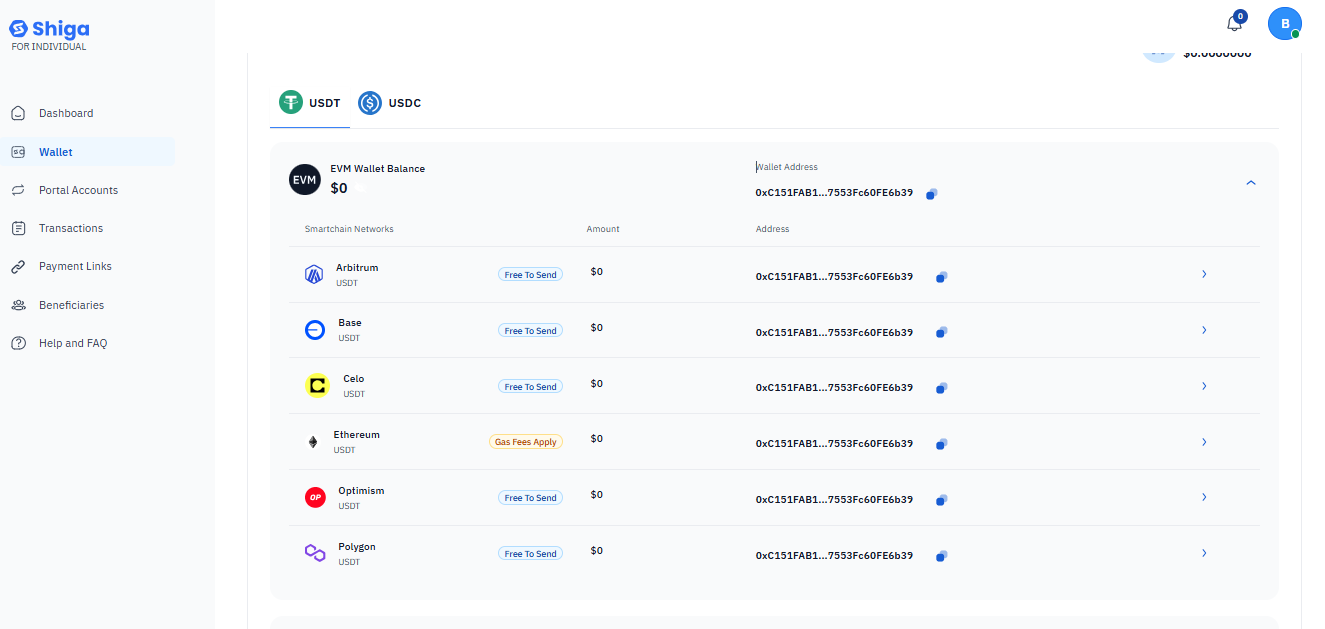
This guide will walk you through how to check your USDT (Tether) balance on the Shiga platform using your EVN Wallet, including all supported smartchain networks.
The Shiga platform supports USDT across multiple blockchain networks. Here are the currently supported networks:
### **Base Network**
### **Celo Network**
### **Abitrum Network**
### **Ethereum Network**
### **Polygon Network**
### **Optimism Network**
## **Access Your Wallet Dashboard**
### **Balance Overview**
* **Total Wallet Balance:** \$0 *(Initially).*
* **Shiga Wallet:** Shows balances for:
* **1USDT** *(Tether).*
* **EYN Wallet Balance:** \$0 *(Additional wallet).*
* **Solana Wallet Balance:** \$0 *(Free to use).*
### **Supported Networks for USDT**
This guide will walk you through how to check your USDT (Tether) balance on the Shiga platform using your EVN Wallet, including all supported smartchain networks.
The Shiga platform supports USDT across multiple blockchain networks. Here are the currently supported networks:
### **Base Network**
### **Celo Network**
### **Abitrum Network**
### **Ethereum Network**
### **Polygon Network**
### **Optimism Network**
 ## **Understanding Your Wallet Information**
Your EVN Wallet displays several important pieces of information:
1. **Junior Address**: This is your public wallet address (shown truncated for security as "OcC13/AB1...7\$35Fc60Ff6A3?").
* Use this address to receive USDT from other wallets or exchanges.
Always verify the first and last few characters when sending/receiving.
2. **Network-Specific Balances**: Each supported network shows its individual USDT balance (all showing \$0 in the example)
If your USDT balance isn't showing correctly:
Verify you're looking at the correct network tab
Refresh the page or log out and back in
## **Understanding Your Wallet Information**
Your EVN Wallet displays several important pieces of information:
1. **Junior Address**: This is your public wallet address (shown truncated for security as "OcC13/AB1...7\$35Fc60Ff6A3?").
* Use this address to receive USDT from other wallets or exchanges.
Always verify the first and last few characters when sending/receiving.
2. **Network-Specific Balances**: Each supported network shows its individual USDT balance (all showing \$0 in the example)
If your USDT balance isn't showing correctly:
Verify you're looking at the correct network tab
Refresh the page or log out and back in