> ## Documentation Index
> Fetch the complete documentation index at: https://docs.shiga.io/llms.txt
> Use this file to discover all available pages before exploring further.
# Swap Tokens in Seconds
> Easy Token Swaps - Anytime, Anywhere
Token swapping allows users to exchange one cryptocurrency for another directly on the Shiga platform. This process is essential for trading, liquidity provision, and cross-chain transactions. Shiga’s swap feature supports multiple blockchain networks, ensuring fast, secure, and cost-efficient trades.
### **Key Features of Shiga’s Swap Functionality**
**Multi-Chain Support** – Swap tokens across Ethereum, Optimism, Base, and other supported networks.\
**Verification** – Enhanced security with OTP (One-Time Password) authentication using Authenticator app or email.\
**Real-Time Rates** – Dynamic and cheap real-time rate.\
**Gas Fee Optimization** – Smart estimation for cost-effective transactions.\
**Transaction Tracking** – Real-time progress updates from initiation to completion.
## **Step-by-Step Token Swap Process**
## 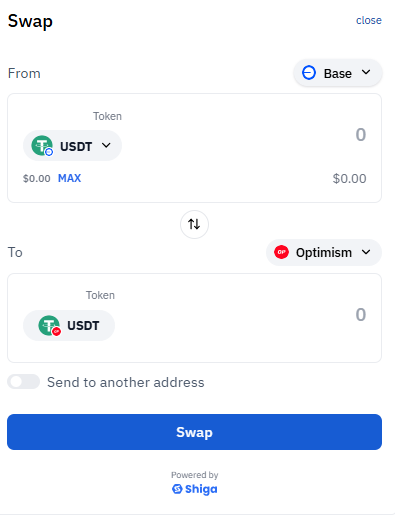 **Access the Swap Interface**
1. Log in to your **Shiga account** (web or mobile app).
2. Navigate to the **Swap** section.
### **Select Tokens & Enter Amount**
1. **From (Source Token):**
* Choose the token you want to swap (e.g., **USDT**).
* Enter the amount manually or click **MAX** to use your full balance.
2. **To (Destination Token):**
* Select the token you wish to receive (e.g., **ETH, SHIGA, or another stablecoin**).
3. (Optional) **Send to another address** – Enable if swapping to a different wallet.
Verify token compatibility (cross-chain swaps may require bridging).
Review exchange rate and estimated fees before proceeding.
##
**Access the Swap Interface**
1. Log in to your **Shiga account** (web or mobile app).
2. Navigate to the **Swap** section.
### **Select Tokens & Enter Amount**
1. **From (Source Token):**
* Choose the token you want to swap (e.g., **USDT**).
* Enter the amount manually or click **MAX** to use your full balance.
2. **To (Destination Token):**
* Select the token you wish to receive (e.g., **ETH, SHIGA, or another stablecoin**).
3. (Optional) **Send to another address** – Enable if swapping to a different wallet.
Verify token compatibility (cross-chain swaps may require bridging).
Review exchange rate and estimated fees before proceeding.
## 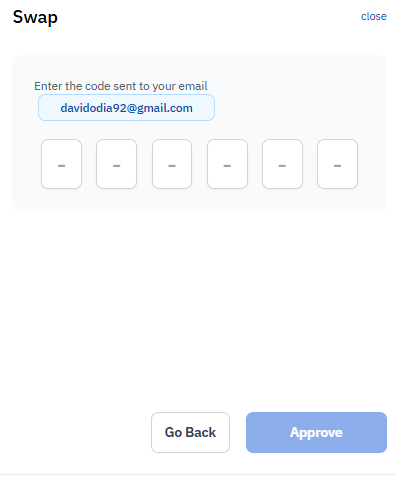 **Authenticate via Email (OTP Verification)**
1. A **6-digit code** will be sent to your registered email or Authenticator App
2. Enter the code in the verification pop-up.
3. Click **Approve** to confirm the swap.
##
**Authenticate via Email (OTP Verification)**
1. A **6-digit code** will be sent to your registered email or Authenticator App
2. Enter the code in the verification pop-up.
3. Click **Approve** to confirm the swap.
## 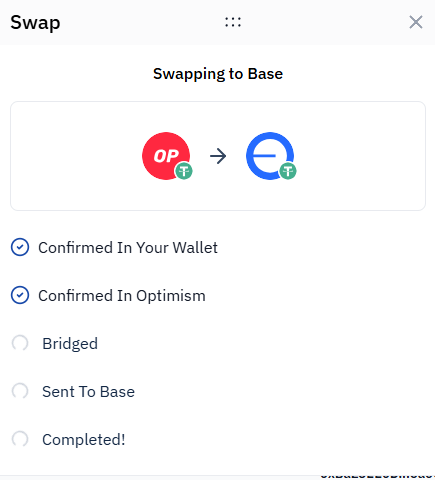 **Track Swap Progress (Cross-Chain Swaps)**
For swaps involving blockchain bridging e.g., USDT(Base) → USDT(Optimism)
1. **Confirmed in Wallet** – Initial approval.
2. **Confirmed in Base Chain** – Processing.
3. **Bridged** – Moving across networks.
4. **Sent to Destination Chain** – Finalizing.
5. **Completed!** – Funds arrive in your wallet.
##
**Track Swap Progress (Cross-Chain Swaps)**
For swaps involving blockchain bridging e.g., USDT(Base) → USDT(Optimism)
1. **Confirmed in Wallet** – Initial approval.
2. **Confirmed in Base Chain** – Processing.
3. **Bridged** – Moving across networks.
4. **Sent to Destination Chain** – Finalizing.
5. **Completed!** – Funds arrive in your wallet.
## 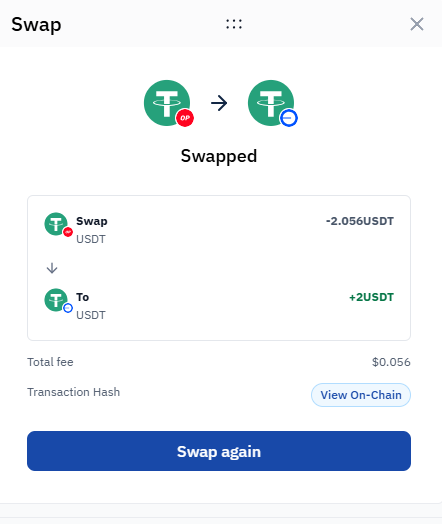 **Swap Completion & On-Chain Verification**
Once completed:\
**Swapped Amount** displayed (e.g., `0.000187USDT`).\
**Transaction Hash** – Click **"View On-chain"** to verify on a block explorer.\
**Option to Swap Again** – Initiate a new trade instantly.
**Swap Completion & On-Chain Verification**
Once completed:\
**Swapped Amount** displayed (e.g., `0.000187USDT`).\
**Transaction Hash** – Click **"View On-chain"** to verify on a block explorer.\
**Option to Swap Again** – Initiate a new trade instantly.