> ## Documentation Index
> Fetch the complete documentation index at: https://docs.shiga.io/llms.txt
> Use this file to discover all available pages before exploring further.
# Tier 1 Dashboard
> What your Dashboard looks like on a new, unverified account — and how the verification prompt changes as you go.
# Tier 1 Dashboard
A Tier 1 account is one where you've created your passkey but haven't finished verifying your identity. Your wallet works — you can send, swap and receive crypto — but converting between crypto and regular money is still locked.
Once verification clears you become Tier 2 and this page changes noticeably. See [Tier 2](/Onboarding/individual/homescreen-tier2).
***
## 1. Your first visit
The page opens with **"Welcome to Enta"** — *"Your wallet is ready to send, swap and receive crypto"*.
Your wallet card shows **Total balance** of **USD 0.00**, with **≈ GBP 0** beneath it, and a single **Move Money** button. Recent transactions reads **"No transactions yet"** — *"Complete a transaction and we'll show your most recent ones here"*.
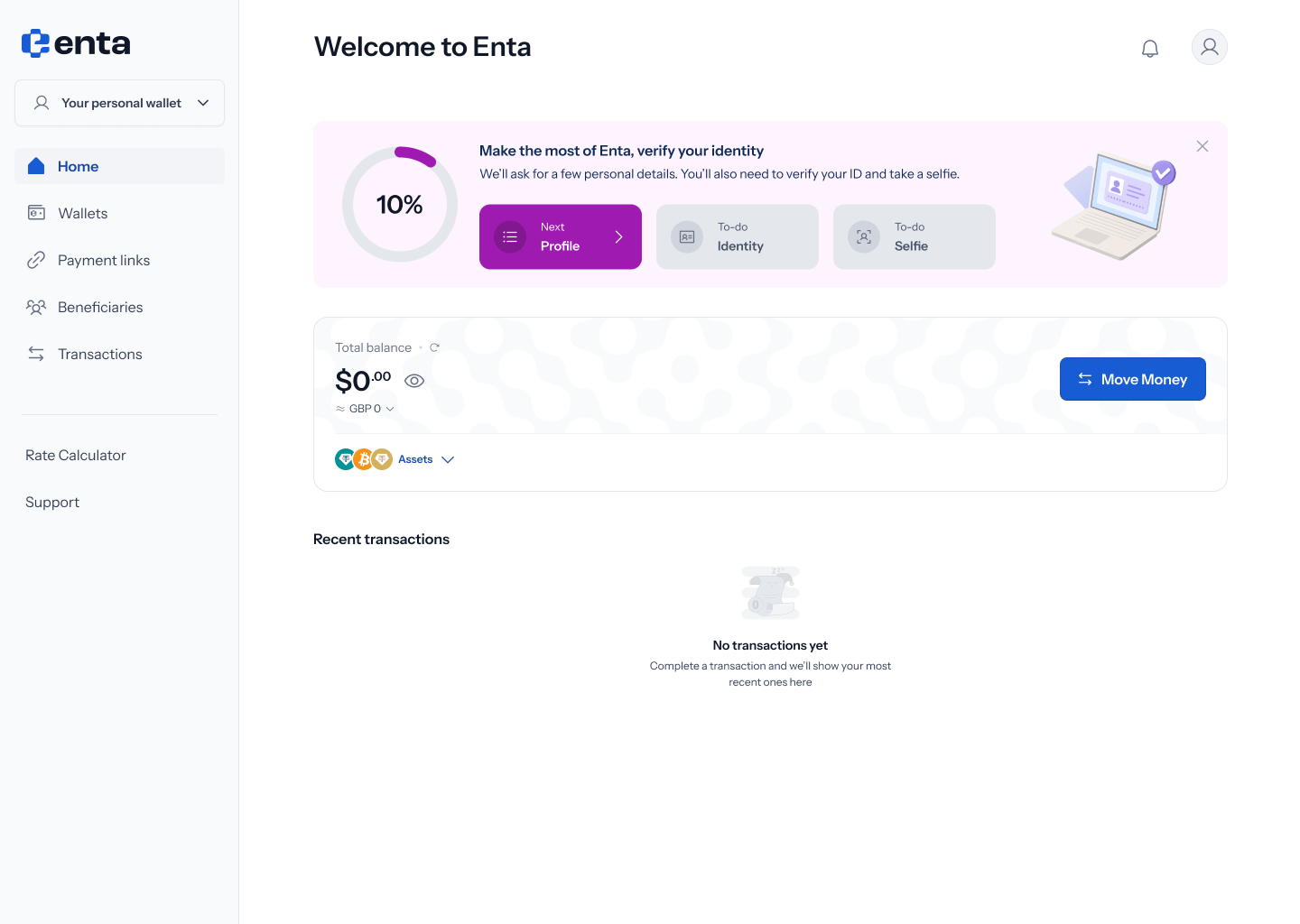 Tapping **Assets** expands the card to show all three assets at zero — **0 USD₮**, **0 BTC** and **0 XAU₮** — each with its value in your comparison currency and its wallet address. USD₮ lists both an **EVM** and a **Solana** address. **Collapse** folds it back up.
.png?fit=max&auto=format&n=Baykm_7aZyi0IY2t&q=85&s=9733dc331b88c1915db261501678308b) The addresses are live from the moment your account exists. You can receive crypto into a Tier 1 wallet before verifying anything.
## 2. The verification prompt
Above the wallet sits a card headed **"Make the most of Enta, verify your identity"** — *"We'll ask for a few personal details. You'll also need to verify your ID and take a selfie."*
A ring shows your progress, starting at **10%**, and three tiles track the stages:
| Tile | Status |
| -------- | --------- |
| Profile | **Next** |
| Identity | **To-do** |
| Selfie | **To-do** |
Tapping the card takes you into [KYC](/Onboarding/individual/kyc).
The card has a minimise control — hovering it shows **"Hide for now"**. Collapsing it clears the space, but the prompt comes back until verification is finished.
## 3. Part-way through verification
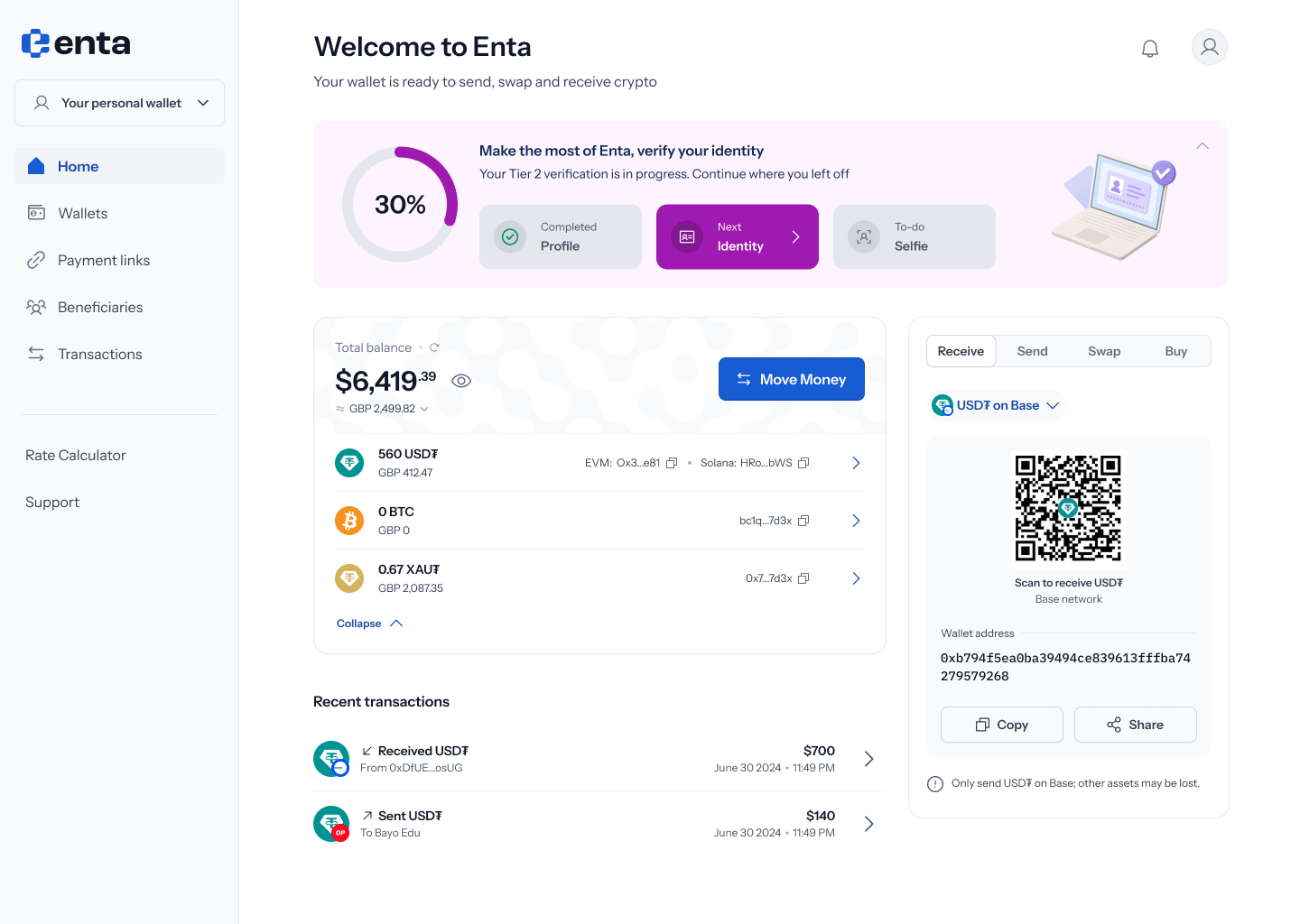
Once you've started, the same card changes its wording to **"Your Tier 2 verification is in progress. Continue where you left off"** and the ring moves to **30%**.
The tiles update to reflect where you are:
| Tile | Status |
| -------- | ------------- |
| Profile | **Completed** |
| Identity | **Next** |
| Selfie | **To-do** |
The addresses are live from the moment your account exists. You can receive crypto into a Tier 1 wallet before verifying anything.
## 2. The verification prompt
Above the wallet sits a card headed **"Make the most of Enta, verify your identity"** — *"We'll ask for a few personal details. You'll also need to verify your ID and take a selfie."*
A ring shows your progress, starting at **10%**, and three tiles track the stages:
| Tile | Status |
| -------- | --------- |
| Profile | **Next** |
| Identity | **To-do** |
| Selfie | **To-do** |
Tapping the card takes you into [KYC](/Onboarding/individual/kyc).
The card has a minimise control — hovering it shows **"Hide for now"**. Collapsing it clears the space, but the prompt comes back until verification is finished.
## 3. Part-way through verification
Once you've started, the same card changes its wording to **"Your Tier 2 verification is in progress. Continue where you left off"** and the ring moves to **30%**.
The tiles update to reflect where you are:
| Tile | Status |
| -------- | ------------- |
| Profile | **Completed** |
| Identity | **Next** |
| Selfie | **To-do** |
 ## 4. If you stop part-way
If you complete a step and leave without finishing, the card marks that step **Completed** and highlights the next one, with a chevron to resume — for example Profile **Completed** and Identity **Next**.
## 4. If you stop part-way
If you complete a step and leave without finishing, the card marks that step **Completed** and highlights the next one, with a chevron to resume — for example Profile **Completed** and Identity **Next**.
.png?fit=max&auto=format&n=Baykm_7aZyi0IY2t&q=85&s=f62b8d5781d22e432ddea3988d6bb589) In the current designs this state still shows the ring at **10%** and reverts to the *"We'll ask for a few personal details…"* wording even though Profile is marked Completed, rather than the "in progress" wording at 30%. Expect this to be tidied up.
## What's still locked
Sending, swapping and receiving crypto all work at Tier 1. What verification unlocks is movement between crypto and regular money — off-ramping to a bank account, and currency swaps. See [Tier 2](/Onboarding/individual/homescreen-tier2) for what appears once you're through.
In the current designs this state still shows the ring at **10%** and reverts to the *"We'll ask for a few personal details…"* wording even though Profile is marked Completed, rather than the "in progress" wording at 30%. Expect this to be tidied up.
## What's still locked
Sending, swapping and receiving crypto all work at Tier 1. What verification unlocks is movement between crypto and regular money — off-ramping to a bank account, and currency swaps. See [Tier 2](/Onboarding/individual/homescreen-tier2) for what appears once you're through.