> ## Documentation Index
> Fetch the complete documentation index at: https://docs.shiga.io/llms.txt
> Use this file to discover all available pages before exploring further.
# KYC (Individual)
> Verifying your identity on a personal account — every screen, explained.
# KYC (Individual)
Verifying your identity moves you from Tier 1 to Tier 2, which unlocks converting between crypto and regular money. It's three steps — **Profile**, **Address**, **Identity** — after a short intro screen, and a progress bar across the top tracks where you are.
Verifying a company account is a different, longer process. See [KYB Landing](/Onboarding/corporate/kyb-landing).
***
## 1. Choose your currencies
Verification starts at **"Unlock currency transactions"** — *"Convert from EUR, GBP, NGN and more to crypto and back"*.
Under **"Select currency needed"** pick the currencies you plan to use: **Euro**, **Pound**, **Naira**. You can select more than one.
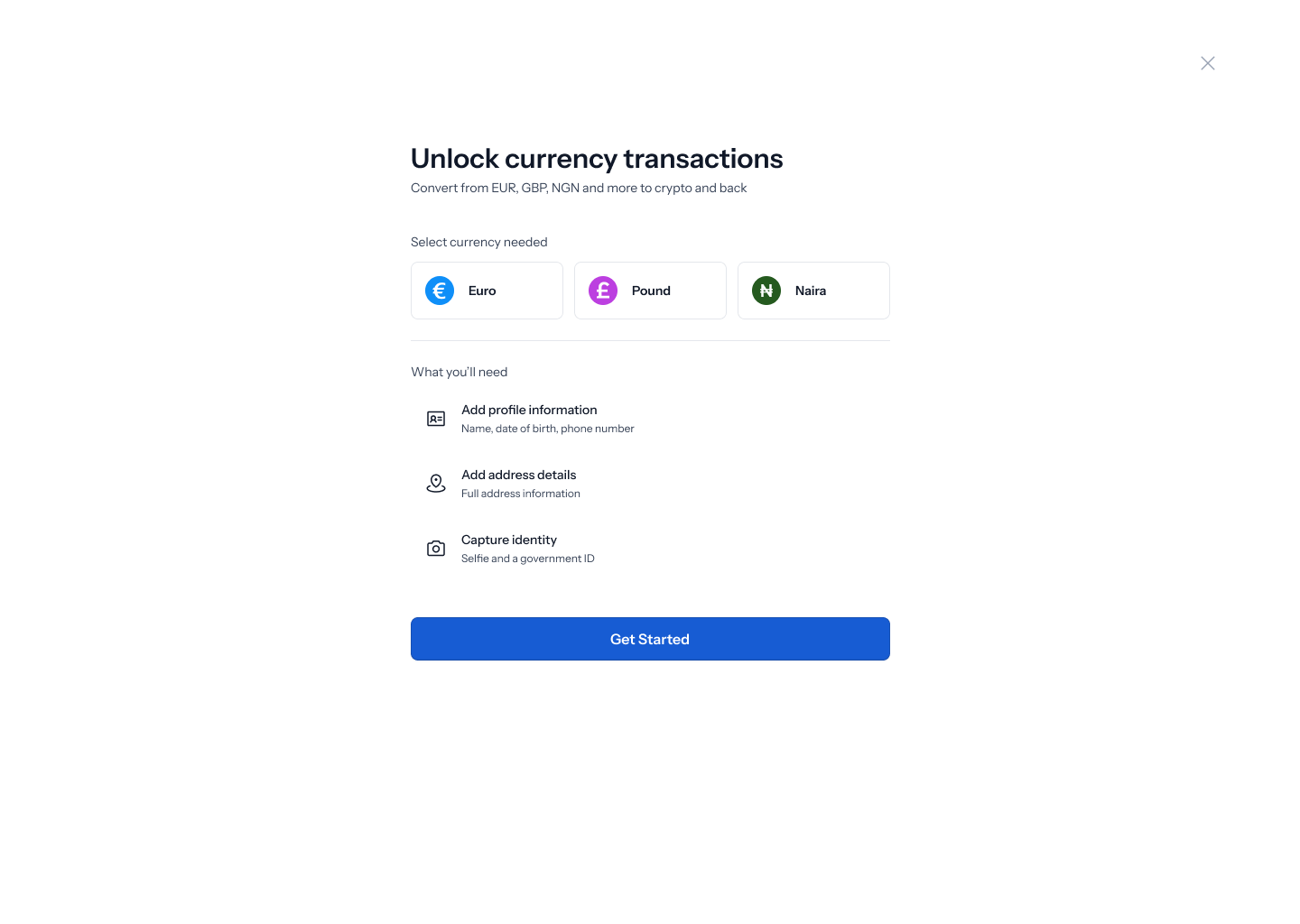 **"What you'll need"** sets out the three steps ahead:
* **Add profile information** — *"Name, date of birth, phone number"*
* **Add address details** — *"Full address information"*
* **Capture identity** — *"Selfie and a government ID"*
Selecting **Naira** changes what's required. The profile line expands to *"Name, date of birth, phone number, BVN, NIN"*, and a checkbox appears that you must tick: **"I understand that BVN and NIN are required for Naira transactions"**.
**"What you'll need"** sets out the three steps ahead:
* **Add profile information** — *"Name, date of birth, phone number"*
* **Add address details** — *"Full address information"*
* **Capture identity** — *"Selfie and a government ID"*
Selecting **Naira** changes what's required. The profile line expands to *"Name, date of birth, phone number, BVN, NIN"*, and a checkbox appears that you must tick: **"I understand that BVN and NIN are required for Naira transactions"**.
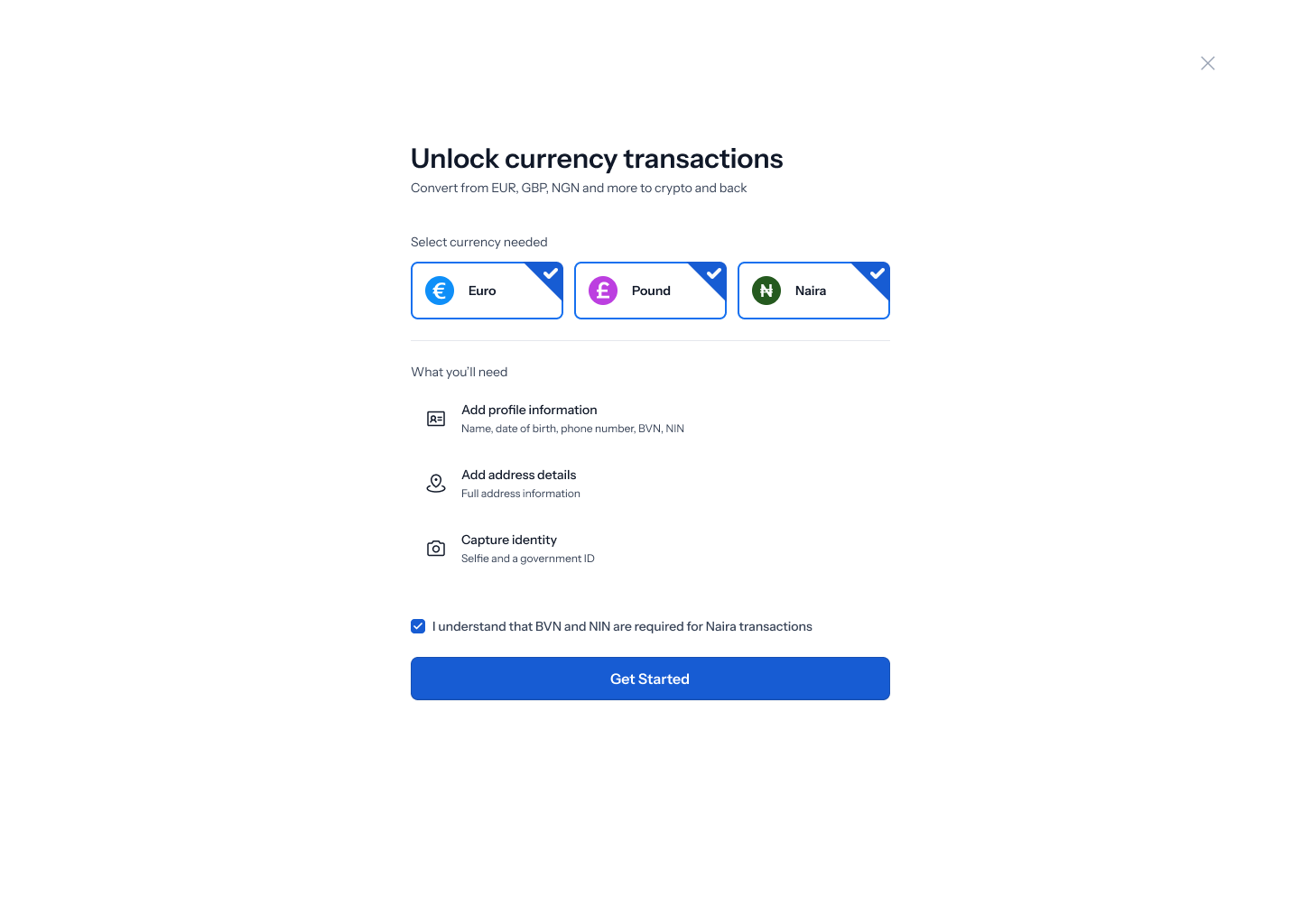 Tap **Get started**.
## 2. Tell us about yourself
The **Profile** step asks **"Tell us about yourself"** — *"As it appears on your government-issued ID."*
Fill in:
| Field | Notes |
| ---------------- | ---------------------------------------- |
| Legal first name | As printed on your ID |
| Legal last name | As printed on your ID |
| Date of birth | Three boxes — **DD** / **MM** / **YYYY** |
| Phone number | With a country dial code selector |
| BVN | Naira transactions only |
| NIN | Naira transactions only |
Tap **Get started**.
## 2. Tell us about yourself
The **Profile** step asks **"Tell us about yourself"** — *"As it appears on your government-issued ID."*
Fill in:
| Field | Notes |
| ---------------- | ---------------------------------------- |
| Legal first name | As printed on your ID |
| Legal last name | As printed on your ID |
| Date of birth | Three boxes — **DD** / **MM** / **YYYY** |
| Phone number | With a country dial code selector |
| BVN | Naira transactions only |
| NIN | Naira transactions only |
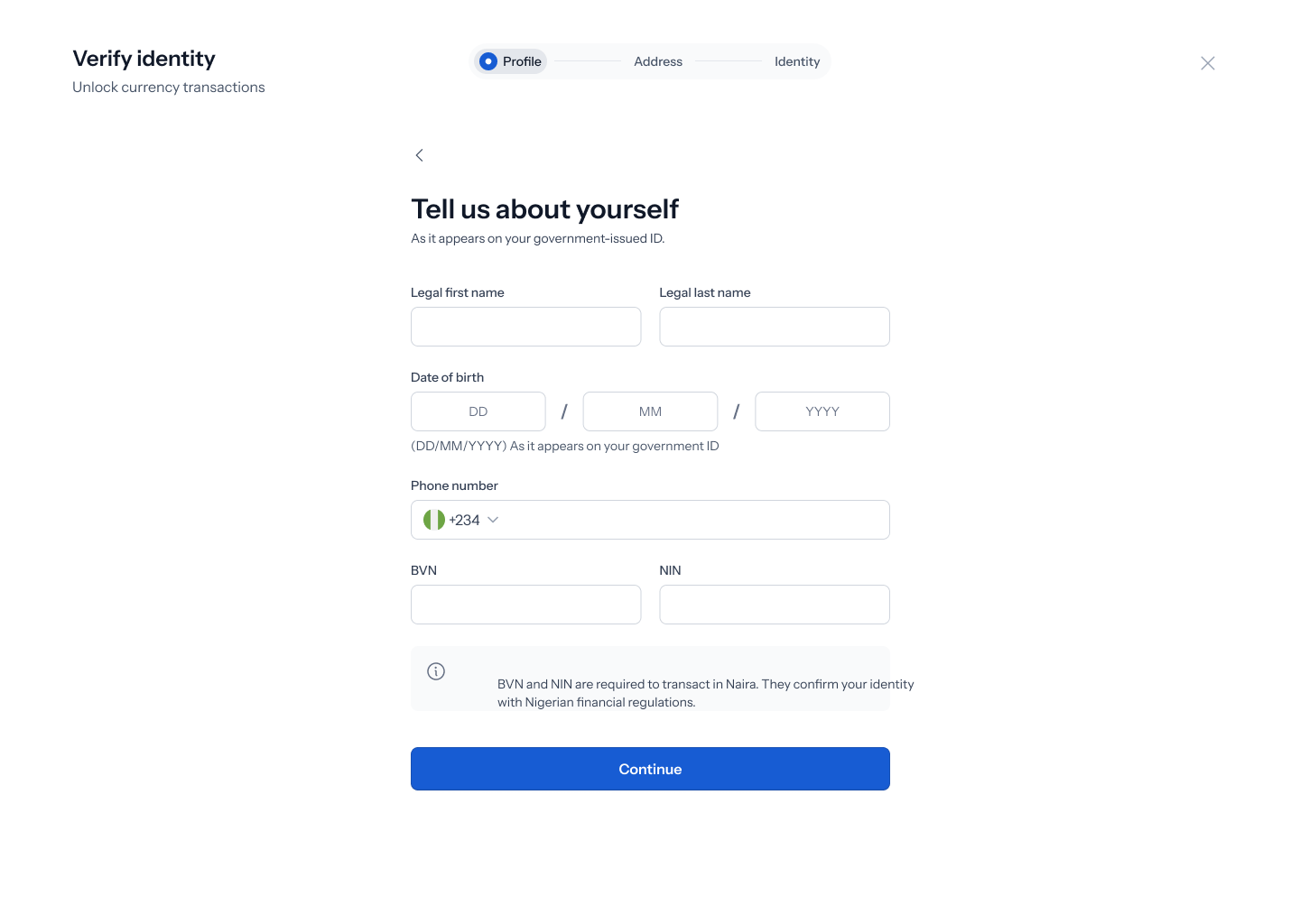 The date of birth field is annotated *"(DD/MM/YYYY) As it appears on your government ID"*, and focusing the first name field shows the reminder *"Enter your first name exactly as it appears on your government-issued ID"*.
An information panel explains the Nigerian identifiers: **"BVN and NIN are required to transact in Naira. They confirm your identity with Nigerian financial regulations."**
Names and dates of birth must match your ID exactly. A shortened first name, a missing middle name or a transposed date is the most common reason verification fails, and it means starting the identity step again.
Tap **Continue**.
## 3. Where you live
The **Address** step asks **"Where do you live?"** — *"As it appears on your proof of address; dated within the last 3 months"*.
Fill in:
* **Country of residence**
* **State/Province/Region**
* **City/Town/Locality**
* **Postal code / ZIP code / Postcode**
* **Address**
The date of birth field is annotated *"(DD/MM/YYYY) As it appears on your government ID"*, and focusing the first name field shows the reminder *"Enter your first name exactly as it appears on your government-issued ID"*.
An information panel explains the Nigerian identifiers: **"BVN and NIN are required to transact in Naira. They confirm your identity with Nigerian financial regulations."**
Names and dates of birth must match your ID exactly. A shortened first name, a missing middle name or a transposed date is the most common reason verification fails, and it means starting the identity step again.
Tap **Continue**.
## 3. Where you live
The **Address** step asks **"Where do you live?"** — *"As it appears on your proof of address; dated within the last 3 months"*.
Fill in:
* **Country of residence**
* **State/Province/Region**
* **City/Town/Locality**
* **Postal code / ZIP code / Postcode**
* **Address**
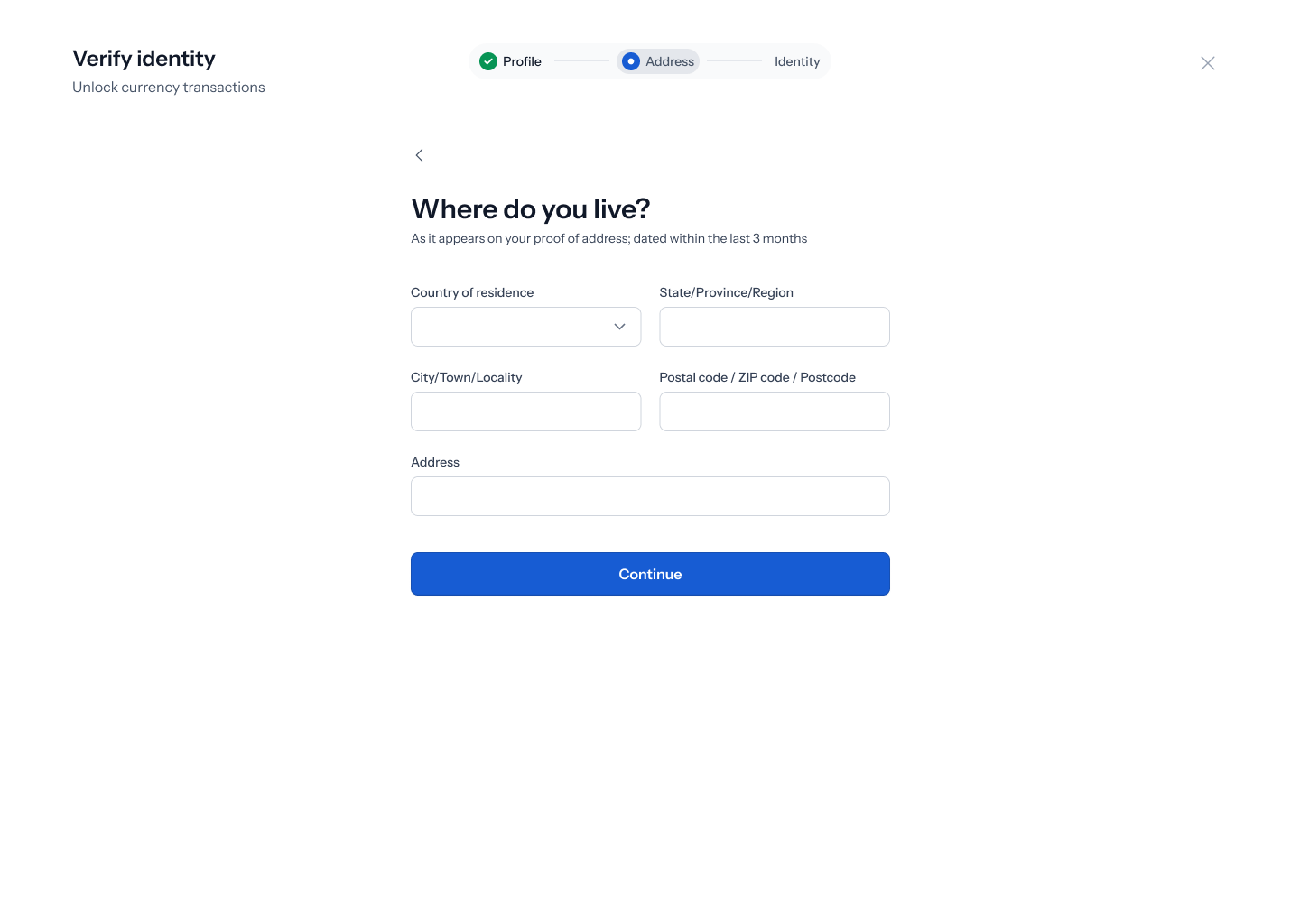 Have a recent bank statement or utility bill to hand and copy the address from it exactly. The document has to be dated within the last three months.
Tap **Continue**.
## 4. Verify your identity
The **Identity** step is headed **"Let's verify your identity"** and tells you what's being checked: your **Selfie** and a **Government issued ID**.
Have a recent bank statement or utility bill to hand and copy the address from it exactly. The document has to be dated within the last three months.
Tap **Continue**.
## 4. Verify your identity
The **Identity** step is headed **"Let's verify your identity"** and tells you what's being checked: your **Selfie** and a **Government issued ID**.
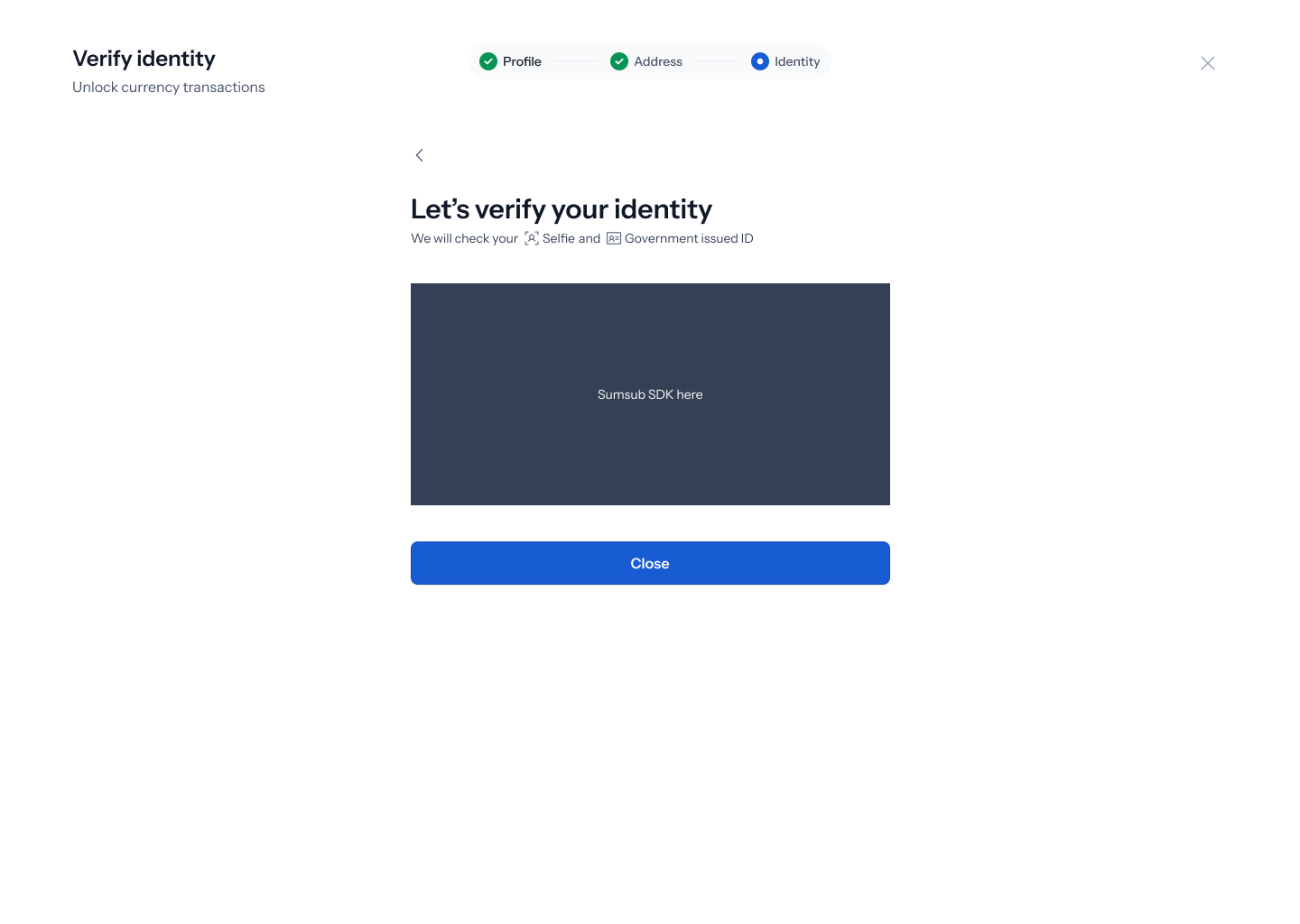 Capture happens in an embedded verification tool that opens inside this screen. It walks you through photographing your ID and taking a live selfie, then matches one against the other.
Good lighting, no hat, no sunglasses, and hold the ID flat with no glare on it. These are the things that cause most retries.
## 5. If your selfie doesn't match
If the check can't match your face to your ID, the screen returns an error: **"Your selfie didn't match the photo on your ID. Try again in good lighting, no hat or sunglasses."**
Capture happens in an embedded verification tool that opens inside this screen. It walks you through photographing your ID and taking a live selfie, then matches one against the other.
Good lighting, no hat, no sunglasses, and hold the ID flat with no glare on it. These are the things that cause most retries.
## 5. If your selfie doesn't match
If the check can't match your face to your ID, the screen returns an error: **"Your selfie didn't match the photo on your ID. Try again in good lighting, no hat or sunglasses."**
.png?fit=max&auto=format&n=Baykm_7aZyi0IY2t&q=85&s=4afee702b0f263d2756be337f4cbca07) You can retry from the same screen. A mismatch on the first attempt is common and doesn't count against you — it's usually lighting or a partly covered face rather than a real problem.
## 6. After you submit
Once submitted, verification is reviewed rather than instant. Your Dashboard keeps showing the verification card, now reading **"Your Tier 2 verification is in progress. Continue where you left off"** — see [Tier 1 Dashboard](/Onboarding/individual/homescreen-tier1).
When it clears, the card is replaced by **"You're fully verified"** — *"Off-ramp, FX swaps are now unlocked"* — and you're on [Tier 2](/Onboarding/individual/homescreen-tier2).
You can retry from the same screen. A mismatch on the first attempt is common and doesn't count against you — it's usually lighting or a partly covered face rather than a real problem.
## 6. After you submit
Once submitted, verification is reviewed rather than instant. Your Dashboard keeps showing the verification card, now reading **"Your Tier 2 verification is in progress. Continue where you left off"** — see [Tier 1 Dashboard](/Onboarding/individual/homescreen-tier1).
When it clears, the card is replaced by **"You're fully verified"** — *"Off-ramp, FX swaps are now unlocked"* — and you're on [Tier 2](/Onboarding/individual/homescreen-tier2).