> ## Documentation Index
> Fetch the complete documentation index at: https://docs.shiga.io/llms.txt
> Use this file to discover all available pages before exploring further.
# Bitcoin Network Wallet
> Your BTC wallet on the main Bitcoin blockchain — deposit, withdraw, swap, and its transaction history.
# Bitcoin Network Wallet
This is your BTC balance on the original Bitcoin blockchain — the row labelled **Slower, high security** on the [BTC tab](/Wallet/btc/overview).
***
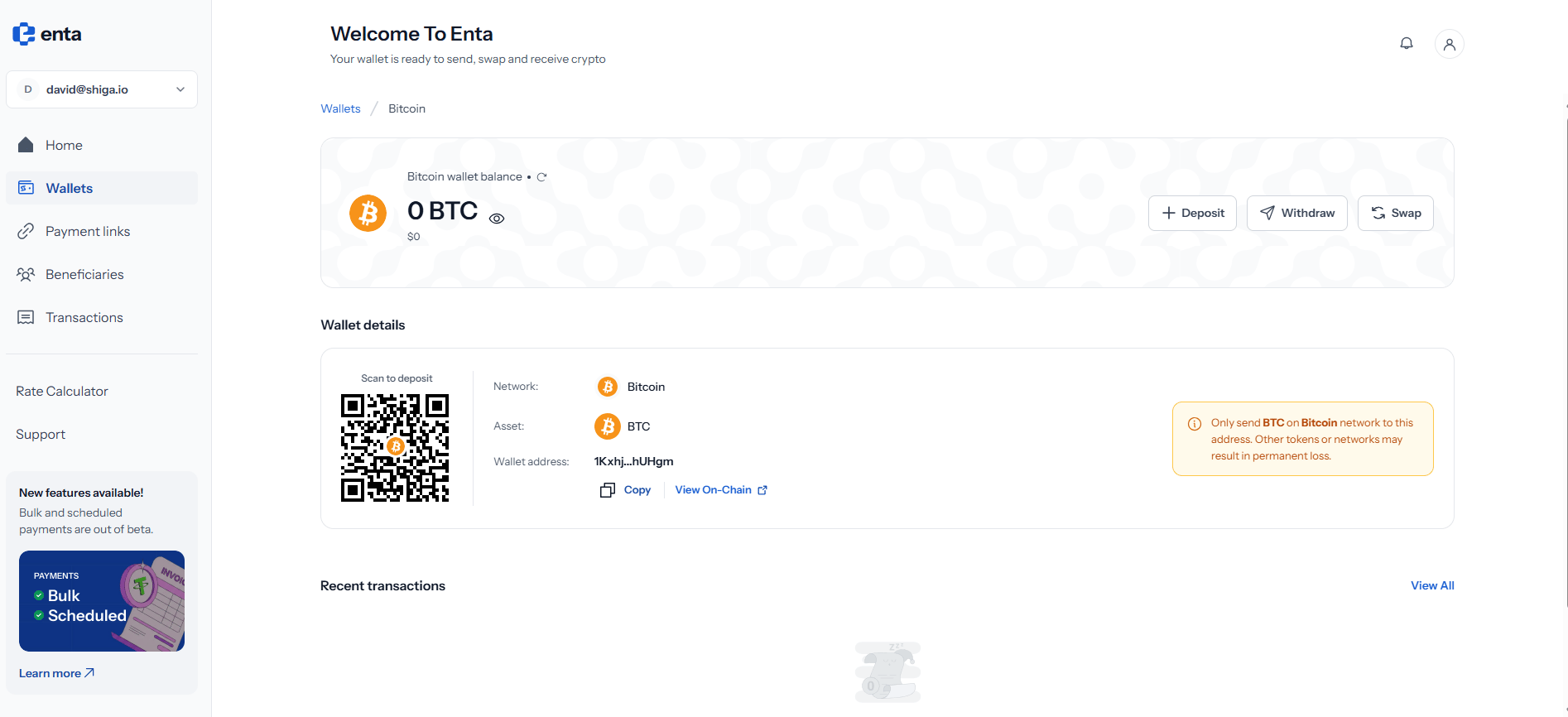
## 1. The wallet header
A breadcrumb at the top reads **Wallets / Bitcoin**, and tapping **Wallets** takes you back.
Beneath it sits **Bitcoin wallet balance** for this network alone, with your BTC amount, its approximate value underneath, and an eye icon to hide both.
Three actions sit on the right: **Deposit**, **Withdraw** and **Swap**.
 ## 2. Wallet details
The **Wallet details** panel holds everything someone needs in order to send you Bitcoin on this network:
| Field | What it shows |
| ------------------- | ------------------------------------------------------------------------------------------------- |
| **Scan to deposit** | A QR code of the address, for scanning from another wallet app |
| **Network** | **Bitcoin** |
| **Asset** | **BTC** |
| **Wallet address** | Your Bitcoin address, truncated — for example `1Kxhj…hUHgm` — with **Copy** and **View On-Chain** |
**View On-Chain** opens the address in a public block explorer, so you can confirm a payment independently of Enta.
The panel carries a caution: only send **BTC** on the **Bitcoin** network to this address. Other tokens or networks may result in permanent loss.
In particular, this address will **not** receive funds sent over the [Spark network](/Wallet/btc/spark) — Spark uses a different address entirely, beginning with `spark…`.
## 3. Deposit, Withdraw and Swap
**Deposit** opens a short menu headed **"Deposit To Bitcoin To…"** with two ways to fund this wallet — **External wallet** (*"Receive from any crypto address"*), which uses the address and QR code above, and **Bank account** (*"Fund via bank transfer"*), documented in [Bank Account (Onramp)](/MoveMoney/bankonramp).
**Withdraw** opens a matching menu with the same two destinations — **External wallet** (*"Send to any crypto address"*) and **Bank account** (*"Withdraw to your bank"*). Both are documented under Move Money: see [External Address (Withdrawal)](/MoveMoney/externalwithdrawal) and [Bank Account (Offramp)](/MoveMoney/offramp).
**Swap** converts this Bitcoin into another asset, or moves it to the Spark network, without leaving Enta. The full walkthrough is in [Wallet to Wallet (Swap)](/MoveMoney/walletswap).
Transfers on the Bitcoin network need confirmations from the main blockchain, so a deposit here won't appear the instant it's sent. If you need speed, the [Spark network](/Wallet/btc/spark) settles straight away.
## 4. Recent transactions
**Recent transactions** at the bottom lists activity for this network only, with **View All** opening your complete history. On a wallet you haven't used yet you'll see **"Oops!! No transactions here"** — that's just an empty state, not a problem.
Tap any row to expand it for the full detail, including the transaction hash and receipt. See [Transactions](/Product/transactions) for the complete record across every network.
## 2. Wallet details
The **Wallet details** panel holds everything someone needs in order to send you Bitcoin on this network:
| Field | What it shows |
| ------------------- | ------------------------------------------------------------------------------------------------- |
| **Scan to deposit** | A QR code of the address, for scanning from another wallet app |
| **Network** | **Bitcoin** |
| **Asset** | **BTC** |
| **Wallet address** | Your Bitcoin address, truncated — for example `1Kxhj…hUHgm` — with **Copy** and **View On-Chain** |
**View On-Chain** opens the address in a public block explorer, so you can confirm a payment independently of Enta.
The panel carries a caution: only send **BTC** on the **Bitcoin** network to this address. Other tokens or networks may result in permanent loss.
In particular, this address will **not** receive funds sent over the [Spark network](/Wallet/btc/spark) — Spark uses a different address entirely, beginning with `spark…`.
## 3. Deposit, Withdraw and Swap
**Deposit** opens a short menu headed **"Deposit To Bitcoin To…"** with two ways to fund this wallet — **External wallet** (*"Receive from any crypto address"*), which uses the address and QR code above, and **Bank account** (*"Fund via bank transfer"*), documented in [Bank Account (Onramp)](/MoveMoney/bankonramp).
**Withdraw** opens a matching menu with the same two destinations — **External wallet** (*"Send to any crypto address"*) and **Bank account** (*"Withdraw to your bank"*). Both are documented under Move Money: see [External Address (Withdrawal)](/MoveMoney/externalwithdrawal) and [Bank Account (Offramp)](/MoveMoney/offramp).
**Swap** converts this Bitcoin into another asset, or moves it to the Spark network, without leaving Enta. The full walkthrough is in [Wallet to Wallet (Swap)](/MoveMoney/walletswap).
Transfers on the Bitcoin network need confirmations from the main blockchain, so a deposit here won't appear the instant it's sent. If you need speed, the [Spark network](/Wallet/btc/spark) settles straight away.
## 4. Recent transactions
**Recent transactions** at the bottom lists activity for this network only, with **View All** opening your complete history. On a wallet you haven't used yet you'll see **"Oops!! No transactions here"** — that's just an empty state, not a problem.
Tap any row to expand it for the full detail, including the transaction hash and receipt. See [Transactions](/Product/transactions) for the complete record across every network.