> ## Documentation Index
> Fetch the complete documentation index at: https://docs.shiga.io/llms.txt
> Use this file to discover all available pages before exploring further.
# USD₮ (Tether)
> Your USDT holdings, and the three kinds of wallet they sit in — EVM, Solana and Tron.
# USD₮ (Tether)
**USD₮** is Tether's dollar stablecoin — one USD₮ is intended to be worth one US dollar. It's the asset most money moves through in Enta, and it's the first tab on your [Wallets](/Wallet/walletoverview) page.
The same USD₮ exists on many different blockchains. Enta groups them into three wallets, because the network your money sits on decides what it costs to move and who can send to you.
***
## 1. The three wallets
| Wallet | What it covers |
| ---------------------------------------- | --------------------------------------------------------------------------------------------------------------------- |
| [**EVM wallet**](/Wallet/usdt/evm) | One balance spanning every Ethereum-compatible network — Arbitrum, Base, Celo, Ethereum, Optimism, Plasma and Polygon |
| [**Solana wallet**](/Wallet/usdt/solana) | USD₮ held on Solana, which has its own address format |
| [**Tron wallet**](/Wallet/usdt/tron) | USD₮ held on Tron, often called TRC-20 |
Each row shows its balance and its address, with a chevron on the right to open it.
These are three separate balances, not one balance shown three ways. Money on Solana can't be sent from your Tron address, and vice versa. Moving between them is a **Swap**, which Enta can do for you — see [Wallet to Wallet (Swap)](/MoveMoney/walletswap).
## 2. Inside the EVM wallet
**EVM wallet** is the only row that holds more than one network. It shows a single combined balance, and the chevron expands it into the individual chains:
| Network | Fees |
| ------------ | ------------------ |
| **Arbitrum** | **Free to send** |
| **Base** | **Free to send** |
| **Celo** | **Free to send** |
| **Ethereum** | **Gas fees apply** |
| **Optimism** | **Free to send** |
| **Plasma** | **Free to send** |
| **Polygon** | **Free to send** |
Every row shows that network's balance, its wallet address with a copy icon, and a chevron to open it.
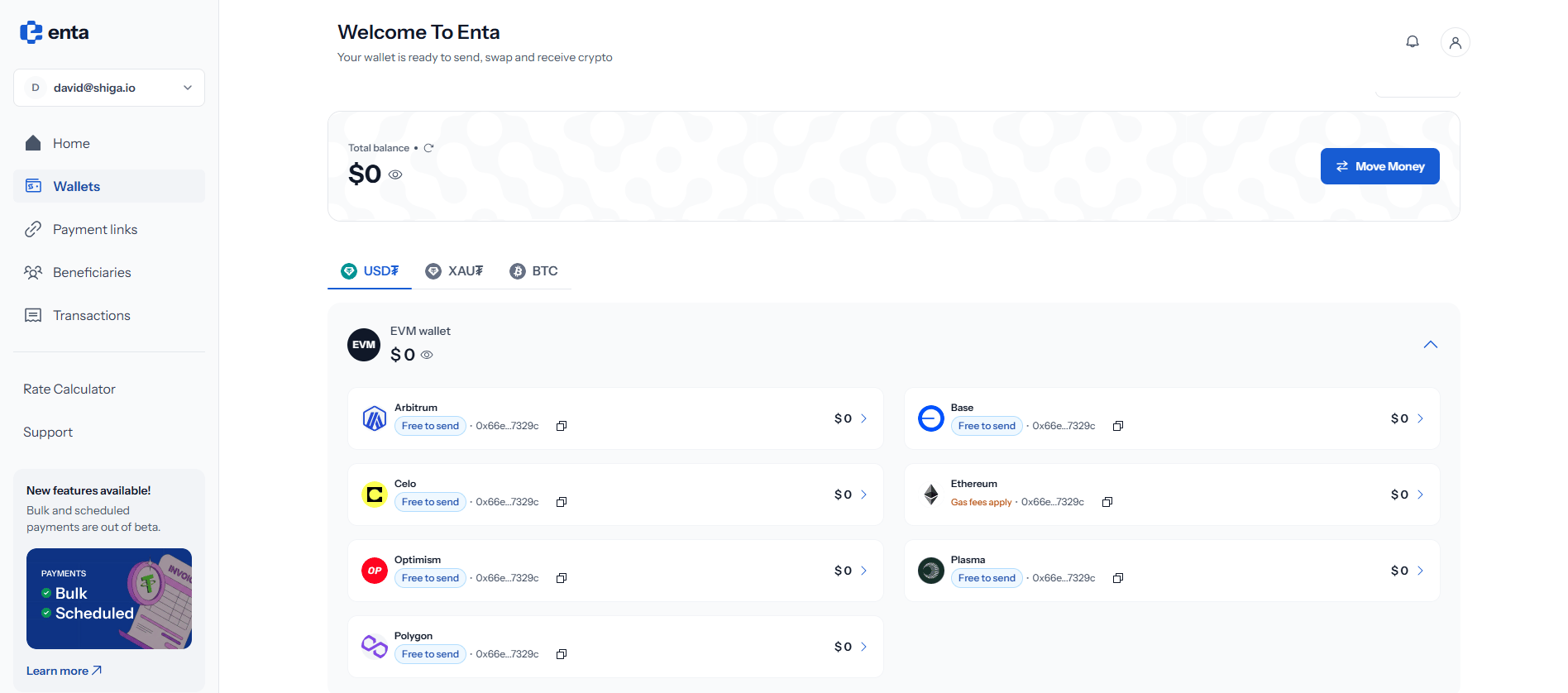 **Ethereum** is the one network marked **Gas fees apply** — every other EVM network here is **Free to send**.
If you're choosing the network yourself, one of the free options will always cost you less. Only use Ethereum when the other side specifically requires it.
All seven EVM networks share the same address, so you'll see the same `0x66e…7329c` on every row. That's expected — one address, yours across every EVM chain. What differs is which chain the funds actually sit on, and that's what the sender has to pick correctly.
## 3. Choosing a network to receive on
When someone asks which network to send USD₮ on, the answer depends on what their wallet or exchange supports:
* **Tron** is the most widely offered, and is what most exchanges default to
* **Solana** is fast and cheap, and increasingly common
* On **EVM**, pick any of the free networks you both support — Arbitrum, Base, Celo, Optimism, Plasma or Polygon
Whichever you agree on, open that network's page and copy the address from there. See [EVM Wallet](/Wallet/usdt/evm), [Solana Wallet](/Wallet/usdt/solana) or [Tron Wallet](/Wallet/usdt/tron).
**Ethereum** is the one network marked **Gas fees apply** — every other EVM network here is **Free to send**.
If you're choosing the network yourself, one of the free options will always cost you less. Only use Ethereum when the other side specifically requires it.
All seven EVM networks share the same address, so you'll see the same `0x66e…7329c` on every row. That's expected — one address, yours across every EVM chain. What differs is which chain the funds actually sit on, and that's what the sender has to pick correctly.
## 3. Choosing a network to receive on
When someone asks which network to send USD₮ on, the answer depends on what their wallet or exchange supports:
* **Tron** is the most widely offered, and is what most exchanges default to
* **Solana** is fast and cheap, and increasingly common
* On **EVM**, pick any of the free networks you both support — Arbitrum, Base, Celo, Optimism, Plasma or Polygon
Whichever you agree on, open that network's page and copy the address from there. See [EVM Wallet](/Wallet/usdt/evm), [Solana Wallet](/Wallet/usdt/solana) or [Tron Wallet](/Wallet/usdt/tron).