> ## Documentation Index
> Fetch the complete documentation index at: https://docs.shiga.io/llms.txt
> Use this file to discover all available pages before exploring further.
# Passkey & Devices
> The devices that hold the passkey for your account
This page is under **Settings > Business > Security**. See also: [Recovery](/settings/business/recovery), [Activity Log](/settings/business/activitylog), [Business Profile](/settings/business/businessprofile), [Statements](/settings/business/statements), [Members](/settings/business/members).
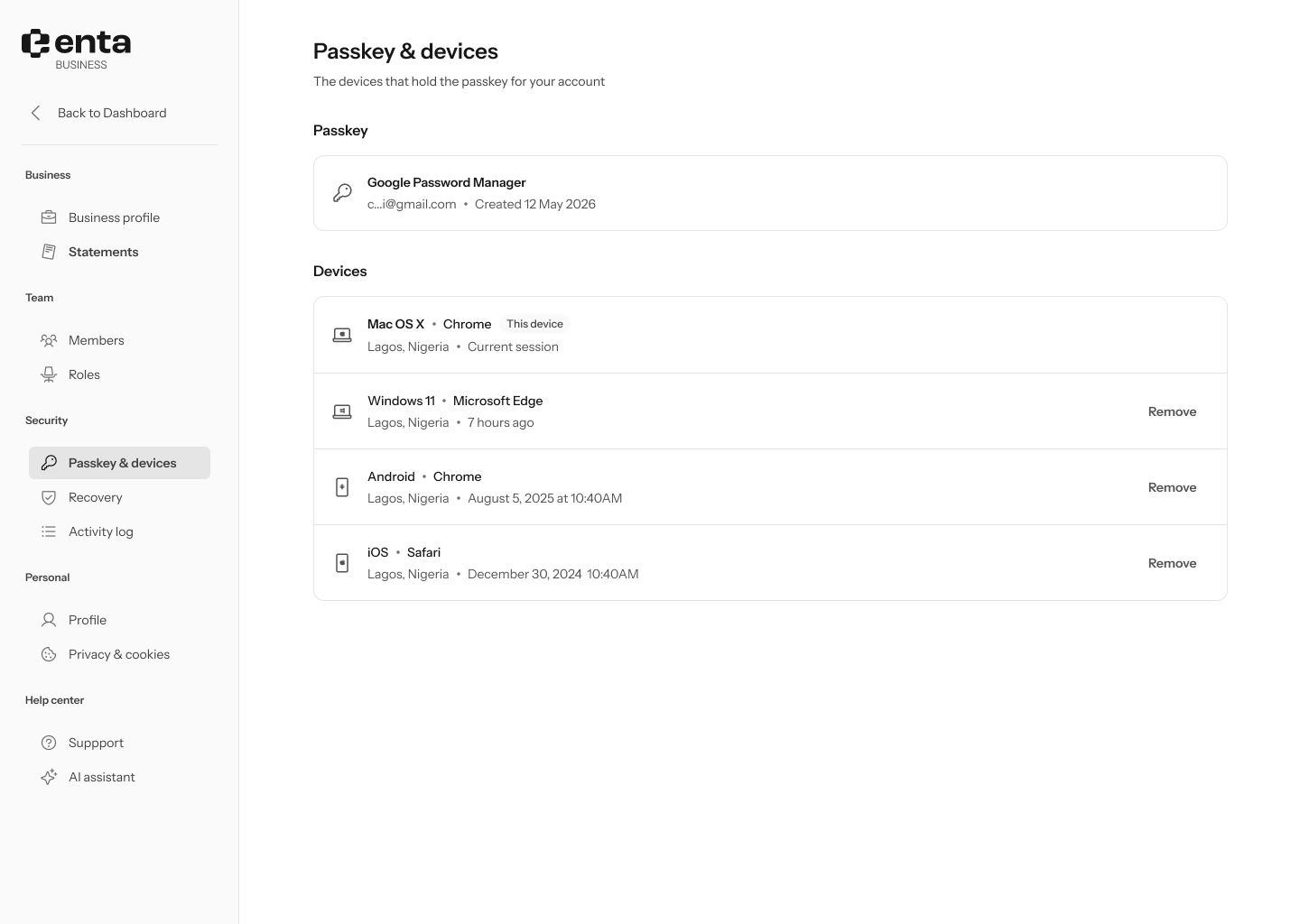 This works the same way as on an individual account — it shows only your own devices and passkey, not other team members'.
## Passkey
Shows the password manager your passkey is stored with, your masked account email, and when it was created.
## Devices
Every device signed in to your account, with its browser, location, and last active time. Your current device is labeled **This device** and can't be removed. Click **Remove** on any other device to sign it out.
This works the same way as on an individual account — it shows only your own devices and passkey, not other team members'.
## Passkey
Shows the password manager your passkey is stored with, your masked account email, and when it was created.
## Devices
Every device signed in to your account, with its browser, location, and last active time. Your current device is labeled **This device** and can't be removed. Click **Remove** on any other device to sign it out.