> ## Documentation Index
> Fetch the complete documentation index at: https://docs.shiga.io/llms.txt
> Use this file to discover all available pages before exploring further.
# Settings Overview
> This section ensures users maintain control over their account security, preferences, and financial records.
**Settings** uses a vertical sidebar, split into two areas depending on your account type: **Individual** and **Business**. Click any item in the sidebar to go directly to that page.
## Individual
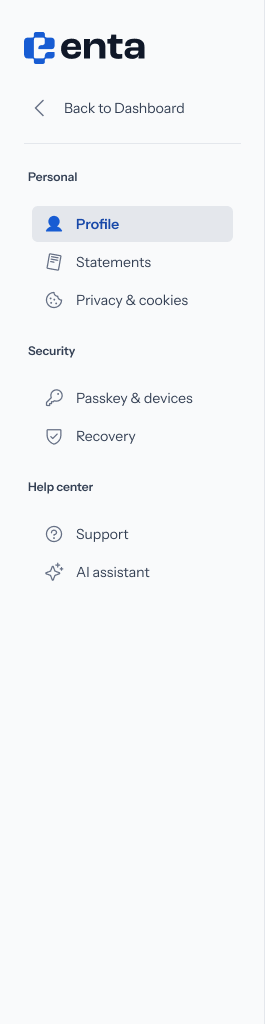 **Personal**
* [Profile](/settings/individual/profile) — your name, contact details, and account type.
* [Statements](/settings/individual/statements) — download your transaction history as a PDF or CSV.
* [Privacy & Cookies](/settings/individual/privacycookies) — choose what Enta can store about your activity.
**Security**
* [Passkey & Devices](/settings/individual/passkeydevices) — where your passkey is stored, and every device signed in to your account.
* [Recovery](/settings/individual/recovery) — your backup email and your Shiga private key.
**Help center**
* [Support](/settings/individual/support) — get help from the Shiga team.
* [AI Assistant](/settings/individual/aiassistant) — manage the assistant and what it can do on your behalf.
## Business
**Personal**
* [Profile](/settings/individual/profile) — your name, contact details, and account type.
* [Statements](/settings/individual/statements) — download your transaction history as a PDF or CSV.
* [Privacy & Cookies](/settings/individual/privacycookies) — choose what Enta can store about your activity.
**Security**
* [Passkey & Devices](/settings/individual/passkeydevices) — where your passkey is stored, and every device signed in to your account.
* [Recovery](/settings/individual/recovery) — your backup email and your Shiga private key.
**Help center**
* [Support](/settings/individual/support) — get help from the Shiga team.
* [AI Assistant](/settings/individual/aiassistant) — manage the assistant and what it can do on your behalf.
## Business
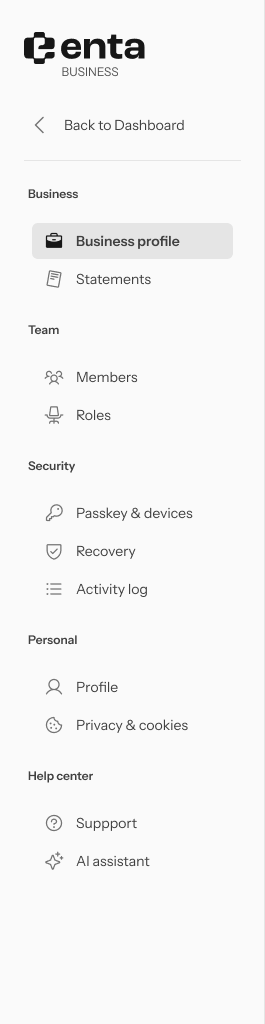 **Business**
* [Business Profile](/settings/business/businessprofile) — your registered business name, address, and logo.
* [Statements](/settings/business/statements) — download your business's transaction history as a PDF or CSV.
**Team**
* [Members](/settings/business/members) — everyone with access to your business.
* [Roles & Permissions](/settings/business/roles) — what Super Admin, Admin, and Viewer can each do.
* [Invite a Member](/settings/business/invitemember) — add a new person to your business.
* [Manage a Member](/settings/business/managemember) — view a member's info and activity, or edit their role.
**Security**
* [Passkey & Devices](/settings/business/passkeydevices) — your own passkey and devices for this account.
* [Recovery](/settings/business/recovery) — your backup email, phone number, and Shiga private key.
* [Activity Log](/settings/business/activitylog) — a record of security and account events across your business.
**Personal**
* [Profile](/settings/business/profile) — your own profile as a team member.
* [Privacy & Cookies](/settings/business/privacycookies) — choose what Enta can store about your activity.
**Help center**
* [Support](/settings/business/support) — get help from the Shiga team.
* [AI Assistant](/settings/business/aiassistant) — manage the assistant and what it can do on your behalf.
**Business**
* [Business Profile](/settings/business/businessprofile) — your registered business name, address, and logo.
* [Statements](/settings/business/statements) — download your business's transaction history as a PDF or CSV.
**Team**
* [Members](/settings/business/members) — everyone with access to your business.
* [Roles & Permissions](/settings/business/roles) — what Super Admin, Admin, and Viewer can each do.
* [Invite a Member](/settings/business/invitemember) — add a new person to your business.
* [Manage a Member](/settings/business/managemember) — view a member's info and activity, or edit their role.
**Security**
* [Passkey & Devices](/settings/business/passkeydevices) — your own passkey and devices for this account.
* [Recovery](/settings/business/recovery) — your backup email, phone number, and Shiga private key.
* [Activity Log](/settings/business/activitylog) — a record of security and account events across your business.
**Personal**
* [Profile](/settings/business/profile) — your own profile as a team member.
* [Privacy & Cookies](/settings/business/privacycookies) — choose what Enta can store about your activity.
**Help center**
* [Support](/settings/business/support) — get help from the Shiga team.
* [AI Assistant](/settings/business/aiassistant) — manage the assistant and what it can do on your behalf.