
Bitcoin Network Wallet

This is your BTC balance on the original Bitcoin blockchain — the row labelled Slower, high security on the BTC tab.

1. The wallet header

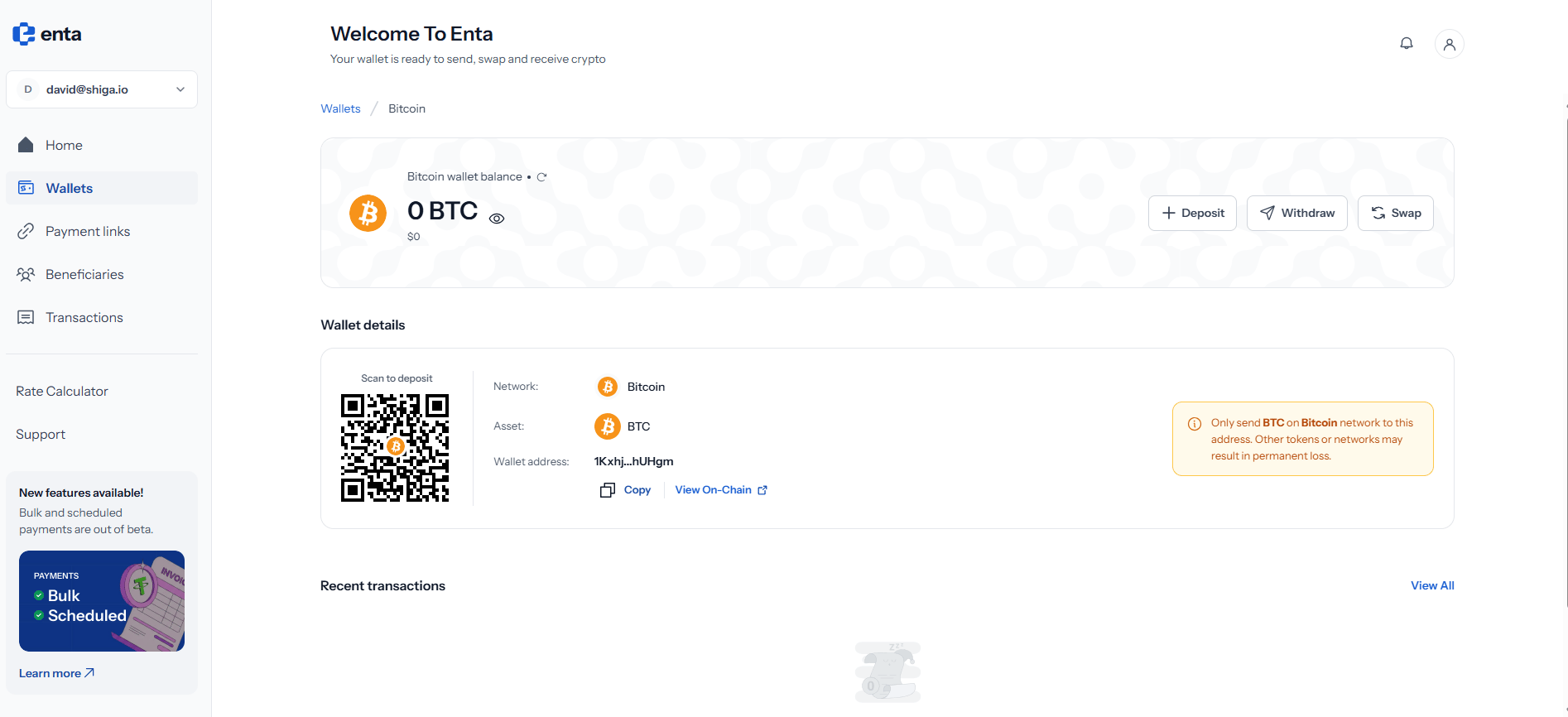
A breadcrumb at the top reads Wallets / Bitcoin, and tapping Wallets takes you back. Beneath it sits Bitcoin wallet balance for this network alone, with your BTC amount, its approximate value underneath, and an eye icon to hide both. Three actions sit on the right: Deposit, Withdraw and Swap. The Bitcoin network wallet
2. Wallet details

The Wallet details panel holds everything someone needs in order to send you Bitcoin on this network: View On-Chain opens the address in a public block explorer, so you can confirm a payment independently of Enta.
The panel carries a caution: only send BTC on the Bitcoin network to this address. Other tokens or networks may result in permanent loss.In particular, this address will not receive funds sent over the Spark network — Spark uses a different address entirely, beginning with spark….

3. Deposit, Withdraw and Swap

Deposit opens a short menu headed “Deposit To Bitcoin To…” with two ways to fund this wallet — External wallet (“Receive from any crypto address”), which uses the address and QR code above, and Bank account (“Fund via bank transfer”), documented in Bank Account (Onramp). Withdraw opens a matching menu with the same two destinations — External wallet (“Send to any crypto address”) and Bank account (“Withdraw to your bank”). Both are documented under Move Money: see External Address (Withdrawal) and Bank Account (Offramp). Swap converts this Bitcoin into another asset, or moves it to the Spark network, without leaving Enta. The full walkthrough is in Wallet to Wallet (Swap).
Transfers on the Bitcoin network need confirmations from the main blockchain, so a deposit here won’t appear the instant it’s sent. If you need speed, the Spark network settles straight away.

4. Recent transactions

Recent transactions at the bottom lists activity for this network only, with View All opening your complete history. On a wallet you haven’t used yet you’ll see “Oops!! No transactions here” — that’s just an empty state, not a problem. Tap any row to expand it for the full detail, including the transaction hash and receipt. See Transactions for the complete record across every network.